Connect a Verified Plugin Market to DSH: Index Source Guide
DSH reads third-party plugin market indexes. Three steps to add the dsh.so market to the Discover tab and install plugins that passed real sandbox install verification.
DSH ships an optional custom plugin market bundle: give it the URL of a plugin index JSON and its Discover tab lists, searches and installs those plugins directly — no detour to a website.
The dsh.so index lives at:
https://www.dsh.so/market/index.jsonIt only lists verified plugins: entries whose install verification passed on the current dsh version (L4 sandbox install / L5 run), with high-risk verdicts (critical / medium) excluded entirely. Three steps to wire it up.
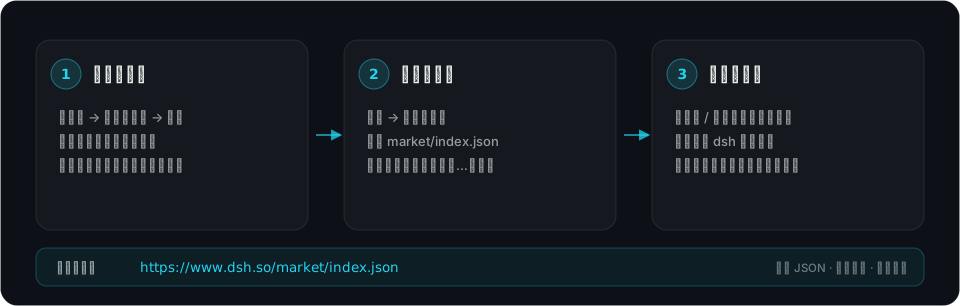
Figure 1: three steps. The index source URL is always https://www.dsh.so/market/index.json.
Prerequisites
- A dsh version that ships the custom plugin market capability (an optional bundle, disabled by default; present in 0.2.1)
- Network access to
https://www.dsh.so(static JSON on a CDN, no API key, cross-origin reads allowed)
Step 1: Enable “Custom plugin markets”
Open the Plugins page in the dsh web sidebar → More next to Experimental plugins → enable Custom plugin markets.
The Plugins page then gains a Discover tab (without the bundle it stays empty and says no plugin markets exist).
Step 2: Add the index source
On the Discover tab click Add index source and enter:
https://www.dsh.so/market/index.jsonConfirm. Manage index sources… lets you add, remove or switch markets later.
Use the final URL: dsh fetches indexes with redirects disabled, so a trailing slash or a www redirect fails outright.
Step 3: Browse and install
The Discover tab lists the market’s plugins and supports:
- Search across package names, titles, descriptions, authors, keywords, categories and labels (fuzzy, works for CJK text without spaces)
- Filter by category and labels
- Versions: every plugin lists its available versions, publish times and compatibility verdict
- Install: one click installs through dsh’s own plugin manager (equivalent to
dsh plugin add); installed bundles show up under the installed tab
Or configure it in the profile
Prefer files? Add the index to the profile’s cordis.patch.yml:
- id: plugin-market
  name: '@deepseek-ai/dsh-plugin-market'
  config:
    indexes:
      - https://www.dsh.so/market/index.json
Restart dsh (or let HMR reload) for it to take effect.
What the index lists — and what it does not
Four gates stand between the registry and the index: it must be installable, it must install, its risk tier must not be high, and its version must be pinnable.
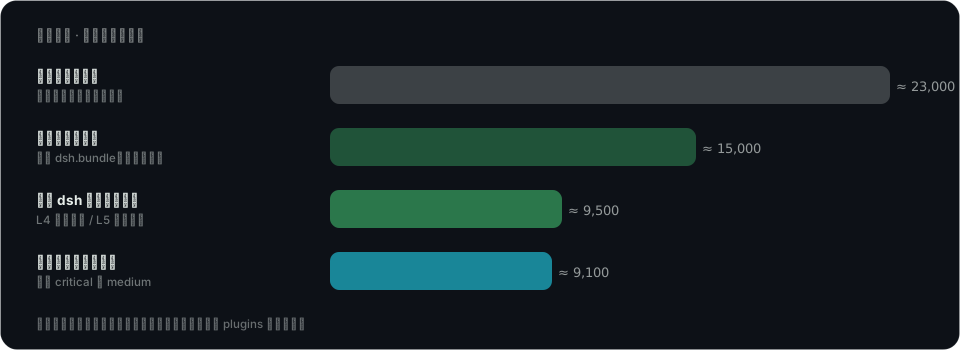
Figure 2: the inclusion funnel. Numbers are order-of-magnitude and change daily.
Inclusion rules (since 2026-10-22):
| Case | Listed |
|---|---|
| Install verification passed on the current dsh version (L4 sandbox install / L5 run) | ✅ |
| Passed only on an older dsh version | ❌ |
| Security verdict critical or medium (the site’s fused tier) | ❌ excluded |
| No security audit verdict yet | ✅ listed, labelled risk-pending |
Ecosystem app (not installable via dsh plugin add) |
❌ |
| Repository renamed / deleted / topic removed | ❌ |
| No exact version resolvable (neither npm nor a release) | ❌ |
Every plugin carries labels, declared once in the document header:
| Label | Meaning |
|---|---|
install-verified |
Installed and ran on the current dsh version |
risk-low |
Site security verdict is low (static scan + vet + model-driven audit, raise-only) |
risk-pending |
No audit verdict yet — check the detail page before installing |
Others (file, search, mcp, …) |
Capability labels used for filtering |
Versions: npm sources give the real published npm version with the registry’s own publish time; git sources pin the commit the GitHub release tag points at, not the default-branch HEAD.
How the index is produced
The index is not a stored file or a separate database: every dsh.so site build derives a format-1 document on the fly from the registry, the install-verification records and the security verdicts, then validates it with DSH’s official parser. A single invalid member makes DSH reject the whole document, so we fail the build instead.
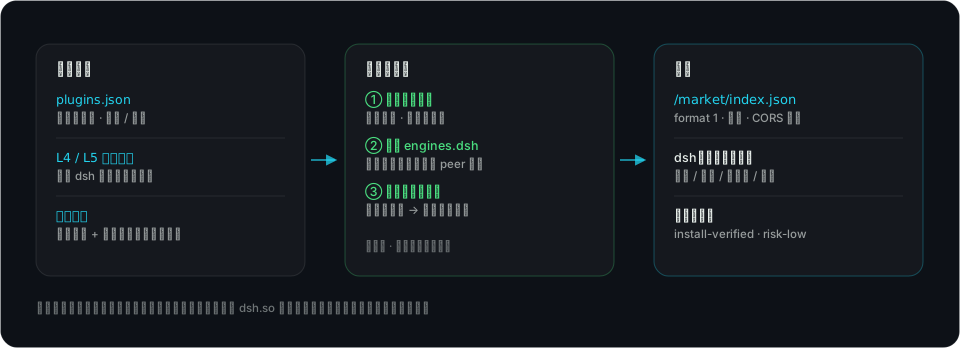
Figure 3: how the index is produced. The artifact follows the deploy; nothing is persisted.
FAQ
A plugin I saw on dsh.so is missing from the index.
Most likely it did not pass install verification on your current dsh version, or it was flagged high-risk. Its detail page shows the verification records and security verdict.
Discover says a plugin is incompatible.
Each version carries an engines.dsh range and dsh evaluates it against your version. When the author’s declared range excludes it, the version is marked incompatible — wait for an update or switch dsh versions.
It is installed but Discover still shows “not installed”.
The market matches installation state by package name. Legacy entries whose package name differs from the index record may not match; trust the installed tab.
How often does it update?
The index is rebuilt with the dsh.so site (one production build per day), and dsh caches a fetched index for 10 minutes by default (Refresh bypasses the cache). Data comes from dsh.so’s plugin registry and install-verification pipelines.
Can I reuse the index?
Yes — public JSON, CORS enabled, CC BY 4.0 with attribution to dsh.so. Field semantics: plugin market index docs.
Are there other index sources?
Yes — a second market, Top Rank, at https://www.dsh.so/market/top-rank.json. It merges the six installable-plugin boards from the leaderboard page: the top 200 of each, deduplicated by package name into roughly 780–800 plugins, ordered by board priority and then rank. Add it exactly like the main index, and feel free to add both — the two documents are independent and a plugin appearing in both is expected. High-risk (critical / medium) entries are excluded here too, but install verification is a label rather than an admission gate, which is what lets the leaderboards’ top 200 in. Field notes and the full comparison: Top Rank index source.